
A client reached out to me after their hosting provider wiped out all website files during an upgrade. No warning, no usable backup, and no media files left on the server. The tricky part was that I was not actively managing the project at that time, so I didn’t have the latest content snapshot either.
Here’s exactly how I recovered the website using a mix of Wayback Machine API, Git, and partial database recovery.
What Was Lost
The hosting provider upgrade resulted in:
- Complete loss of all website files
- So there were no assets left except the ones that was there when I had developed the website
What Was Still Available
This is what saved the project:
- Database was still available from hosting
- I had older development files stored in Git
- Website had snapshots on Internet Archive via Wayback Machine
That combination was enough to rebuild everything.
Step 1: Restore Website Structure Using Git
First thing I did:
- Pulled the latest available codebase from Git
- Restored themes, plugins, and configurations
- Connected the existing database
This brought the site back structurally, but:
- Images were still broken
- Media library references existed, but files didn’t
Step 2: Use Wayback Machine to Recover Images
Since all uploads were gone, the only realistic recovery option was the Wayback Machine.
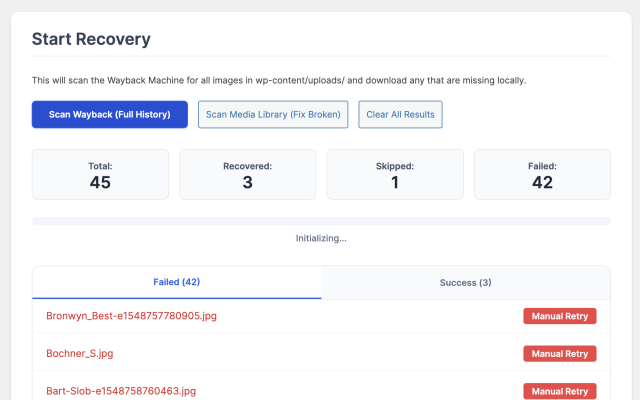
Instead of manually downloading images, I built a custom WordPress plugin to automate recovery.
Step 3: Building a WordPress Plugin for Image Recovery
I created a plugin called:
Smjrifle Wayback Image Recover
What it does:
- Scans Wayback Machine archives for images
- Matches images from
wp-content/uploads/ - Downloads missing files automatically
- Restores them into correct WordPress paths
- Regenerates thumbnails
- Fixes Media Library broken entries
Key Features of the Plugin
1. Wayback CDX API Integration
- Fetches all archived image URLs using:
https://web.archive.org/cdx/search/xd - Filters only valid image formats (jpg, png, webp, etc.)
2. Media Library Scan
- Detects broken attachments in WordPress
- Matches missing files with archived versions
3. Automated Image Recovery
- Downloads images using archived timestamps
- Recreates folder structure
- Inserts or updates WordPress attachments
4. Thumbnail Regeneration
- Uses native WordPress functions:
wp_generate_attachment_metadatawp_update_attachment_metadata
5. Admin UI + Progress Tracking
- Scan full archive or only broken images
- Progress bar with stats:
- Total
- Recovered
- Skipped
- Failed
- Retry failed downloads manually
6. Direct Recovery from Media Library
- “Fetch from Wayback” button inside Media Library
- One-click restore for individual images
Step 4: Sync with Database
Since the database was intact:
- Media entries already existed
- Only physical files were missing
Once images were restored:
- URLs started resolving correctly
- Layout issues were fixed automatically
Step 5: Handling Edge Cases
Not everything was recoverable:
- Some images were never archived
- Some snapshots were incomplete
For those:
- Checked older Git versions
- Replaced critical assets manually
Final Result
- Website fully restored
- Majority of images recovered automatically
- Media library fixed
- Minimal data loss
Most importantly, no full rebuild was required.
Key Takeaways
Hosting backups are not enough
Even if a provider says backups exist, don’t rely on them blindly.
Always keep Git backups
Even outdated code is better than nothing.
Wayback Machine is underrated
It can literally save projects when everything else fails.
Automate recovery when possible
Manual recovery would have taken days.
The plugin reduced it to hours.
Conclusion
This was a real-world reminder that:
Data loss can happen anytime, even during something as routine as a hosting upgrade.
Having:
- version control
- partial backups
- external archives
can make the difference between total loss and full recovery.
If you’re running WordPress sites or handling client projects, build a proper backup strategy. And if things go wrong, tools like the Wayback Machine can still give you a second chance.
Git repo: https://github.com/smjrifle/Smjrifle-Wayback-Image-Recover.git