Modern knowledge workers and developers spend 8–12+ hours daily locked into deep work sessions, leading to chronic eye strain, poor posture, dehydration, and repetitive strain injuries. Traditional productivity and reminder apps suffer from two extremes: either they send noisy, dismissible system push notifications that get buried in the OS notification center, or they present disruptive full-screen modal takeovers that break coding flow and state.
To solve this, I engineered Smjrifle Desktop Reminder, an institutional-grade, cross-platform floating desktop companion and wellness operating system built with Python, PyQt6, and native platform integration layers. It combines hand-drawn pixel art walking animations, non-intrusive HUD speech bubble overlays, independent per-reminder scheduling cadences, and deep OS-level integration (macOS Menu Bar / Dock, Windows Registry, Linux XDG) to cultivate sustainable ergonomics without interrupting developer workflow.
Key Features
🎮 Authentic Pixel-Art Sprite Engine & Organic Walking Animations
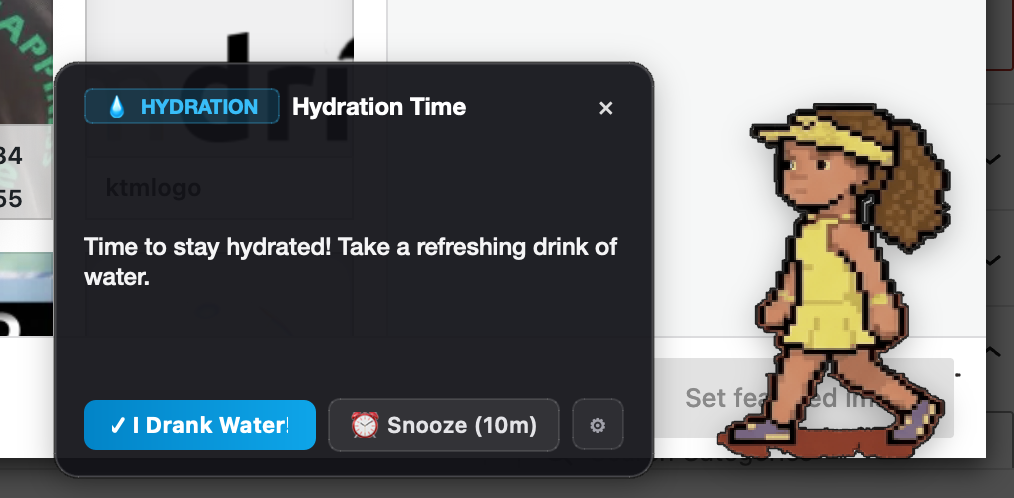
Rather than using generic stock icons or static dialogue boxes, I designed a bespoke pixel-art sprite animation engine. The desktop companion features authentic, hand-drawn multi-frame sprites (including custom Tennis Athlete and Striker #7 sports icons) with fluid 4-step walk cycles and dynamic water-drinking hydration sequences. Sprites are rendered at sub-pixel precision with frame-accurate movie controllers and smart directional orientation based on screen corner coordinates.
🪟 Frameless Translucent Floating HUD & Dynamic Bubble Physics
The notification layer is architected as an unobtrusive, always-on-top floating HUD (Qt.WindowType.FramelessWindowHint, Qt.WidgetAttribute.WA_TranslucentBackground). It positions itself dynamically relative to the active screen geometry and user-selected anchor points (Bottom-Right, Top-Right, Bottom-Left, Top-Left, Center). The accompanying custom-drawn speech bubble features smooth quadratic Bezier curve tails, soft acrylic glassmorphism (#18181b elevation with subtle rgba(255, 255, 255, 0.1) border highlights), and 1-click action triggers (“Got It!”, “Snooze 10m”).
⏱️ Asynchronous Independent Multi-Reminder Scheduling Matrix
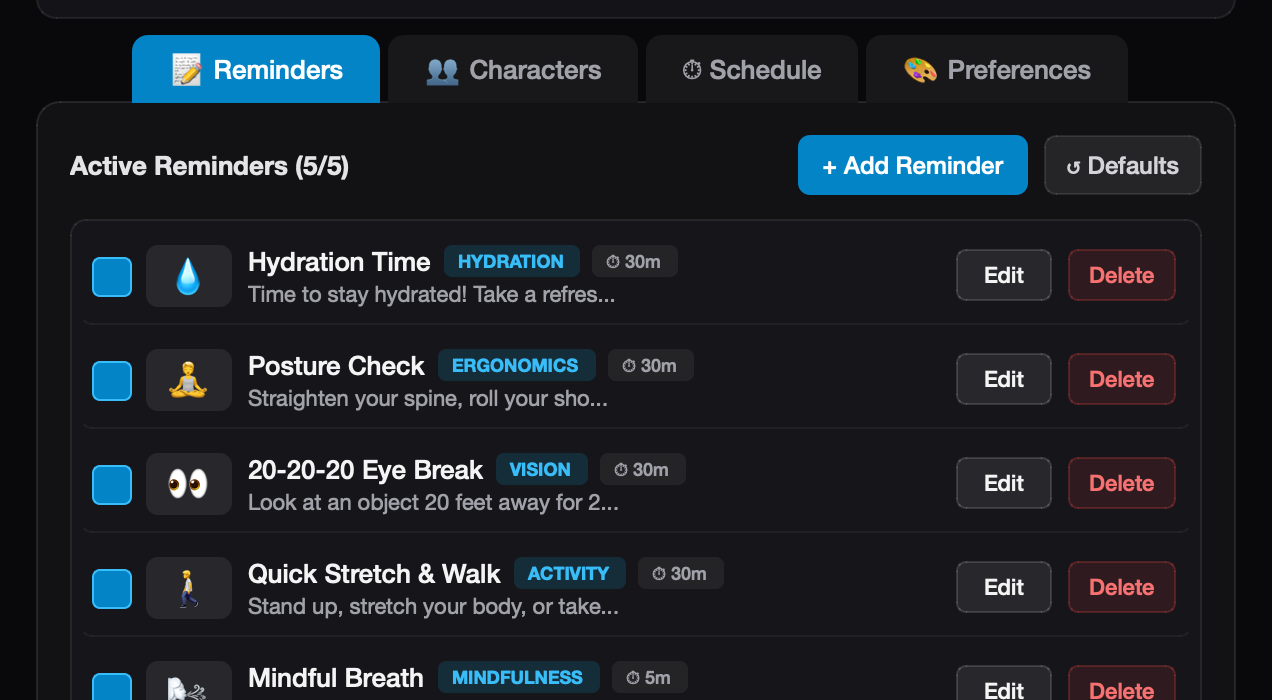
Different wellness activities require vastly different intervals (e.g., 20-minute 20-20-20 eye breaks vs. 45-minute posture checks vs. 90-minute deep stretches). I architected a multi-threaded scheduling engine with independent countdown clocks (next_due timestamps) for every active reminder. Users can seamlessly create, customize, enable/disable, and tune intervals with millisecond accuracy, backed by sequential cycling or random rotation delivery modes.
🎨 Modern Dark Acrylic Design System & Tactile Ergonomics
Drawing inspiration from modern design systems (shadcn/ui, beautifului.dev, and Apple Human Interface Guidelines), the dashboard UI features a refined dark theme with responsive pill tags, crisp typography, and fluid micro-interactions. The list view utilizes dynamic resize-mode adjustment (QListWidget.ResizeMode.Adjust) with custom-styled action buttons (Edit / Delete) engineered with strict layout bounding to ensure 100% visibility across all display DPI scales with zero horizontal scroll leakage.
🖥️ Zero-Friction OS-Level Autostart & Dynamic Presence Engine
The application integrates natively with host operating systems via fail-soft autostart and background handlers:
- macOS: Native LaunchAgents plist management (
~/Library/LaunchAgents), dynamic Dock vs. Menu Bar presence switching via AppKit activation policies (NSApplicationActivationPolicyRegular↔NSApplicationActivationPolicyAccessory), and Dock icon click reactivation filters. - Windows: Direct
winregregistry management underHKCU\Software\Microsoft\Windows\CurrentVersion\Run. - Linux: Standard XDG autostart
.desktopfile generation under~/.config/autostart.
🚀 Automated Multi-Platform CI/CD Build Pipeline
To enable instant distribution, I configured a continuous integration build matrix using GitHub Actions (.github/workflows/build.yml). The automated pipeline compiles and packages native standalone bundles across all three platforms on every release tag:
- macOS: Standalone
.appbundle and compressed.zipdistribution. - Windows: One-file standalone
.exewith multi-resolution.icoassets. - Linux: Standalone ELF binary archive with X11/Wayland dependencies.
Outcome
Smjrifle Desktop Reminder transforms routine ergonomic reminders into an engaging, non-intrusive desktop habit. It delivers zero-latency local performance, zero cloud telemetry, complete data privacy, and a delightful pixel-art presence that has significantly reduced physical fatigue and screen strain during marathon programming sessions.
Project Links
- GitHub Repository: https://github.com/smjrifle/Smjrifle-Desktop-Reminder
- GitLab Repository: https://gitlab.com/smjrifle/smjrifle-desktop-reminder
- License: MIT License