
We all remember captcha of MeroSanoKatha, if not here is a preview
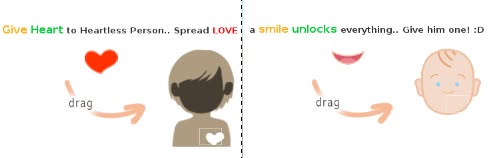
Flexible Drag-and-Drop Captcha With Snap Effect
Instead of typing letters, users can drag a smiley face onto a target area. This interactive approach makes captchas more fun and beginner-friendly.
We improved the previous version by adding:
- Snap-to-target effect
- Boundary enforcement
- Clear status messages
HTML Structure
<img src="smile.png" id="draggable_object">
<div id="parent_div">
  <img src="face.png" id="droppable_object">
  <div class="ref"></div>
</div>
<div id="status_msg"></div>
<h3>Drag The smile :) onto the Green Target</h3>draggable_object→ the object to drag.droppable_object→ the drop area..ref→ optional visual reference for exact drop location.status_msg→ shows feedback messages.
JavaScript Logic
The script uses mousedown, mousemove, and mouseup events:
const dragEle = document.getElementById('draggable_object');
const dropTarget = document.getElementById('droppable_object');
const msg = document.getElementById('status_msg');

// Default position
const defTop = 20, defLeft = 20;

// Final snap position
const finalTop = 130, finalLeft = 270;

// Drag boundaries
const bounds = { max: 600, min: 0 };
const offset = { x: 25, y: 25 };

dragEle.addEventListener("mousedown", startDrag);

function startDrag(event) {
    if (dragEle.dataset.dropped !== "true") {
        document.addEventListener("mousemove", performDrag);
        document.addEventListener("mouseup", performDrop);
    }
    event.preventDefault();
}

function performDrag(event) {
    let x = event.clientX - offset.x;
    let y = event.clientY - offset.y;

    if (x < bounds.max && x > bounds.min && y < bounds.max && y > bounds.min) {
        dragEle.style.left = x + 'px';
        dragEle.style.top = y + 'px';
    } else {
        resetPosition("Out of bounds! Stay in the white area.");
        document.removeEventListener("mousemove", performDrag);
    }
}

function performDrop(event) {
    document.removeEventListener("mousemove", performDrag);
    document.removeEventListener("mouseup", performDrop);

    const currentTop = parseInt(dragEle.style.top);
    const currentLeft = parseInt(dragEle.style.left);
    const threshold = 15;

    const isCloseEnough =
        Math.abs(currentTop - finalTop) <= threshold &&
        Math.abs(currentLeft - finalLeft) <= threshold;

    if (isCloseEnough) {
        msg.innerHTML = "<span style='color:green;'>Perfect! Locked in position.</span>";
        dragEle.style.top = finalTop + "px";
        dragEle.style.left = finalLeft + "px";
        dragEle.dataset.dropped = "true";
        dragEle.style.cursor = "default";
        dragEle.removeEventListener("mousedown", startDrag);
    } else {
        resetPosition("Not quite! Try to place it exactly below the nose.");
    }
}

function resetPosition(errorText) {
    dragEle.style.left = defLeft + 'px';
    dragEle.style.top = defTop + 'px';
    msg.innerHTML = errorText;
}How It Works
- mousedown → starts the drag if the object isn’t already in the final position.
- mousemove → moves the object while respecting the drag bounds.
- mouseup → checks if the drop is successful.
- If yes, it locks the object in place.
- If no, it returns to default position with a message.
Step 3: Customize and Get Creative
- Change the images to whatever you like (
draggable_objectanddroppable_object). - Adjust the snap coordinates (
finalTop,finalLeft) and the threshold to match your target area. - Add more draggable objects for multi-step puzzles or captchas.
- Include animations, sound effects, or a reset button for extra interactivity.
Final Notes
- This is a JavaScript-only solution, so it works on any modern browser.
- Great for beginners to learn about events, dragging logic, and DOM manipulation.
- Works perfectly for interactive games, tutorials, or captchas.
This approach makes learning DOM events, dragging logic, and collision detection easy for beginners.
You can check the full working version on GitHub here.