
WordPress is a cool cms for blogging and web development, how ever it lacks a method to create the jump menus. Jump menus are the titles/section of the post displayed right above the post which when clicked scrolls down to the content. WordPress Create Jump Menu will guide you on creating jump menu.
Creating a Dynamic Jump Menu in WordPress
WordPress is a powerful CMS for blogging and web development. However, it does not provide a built-in way to generate jump menus out of the box.
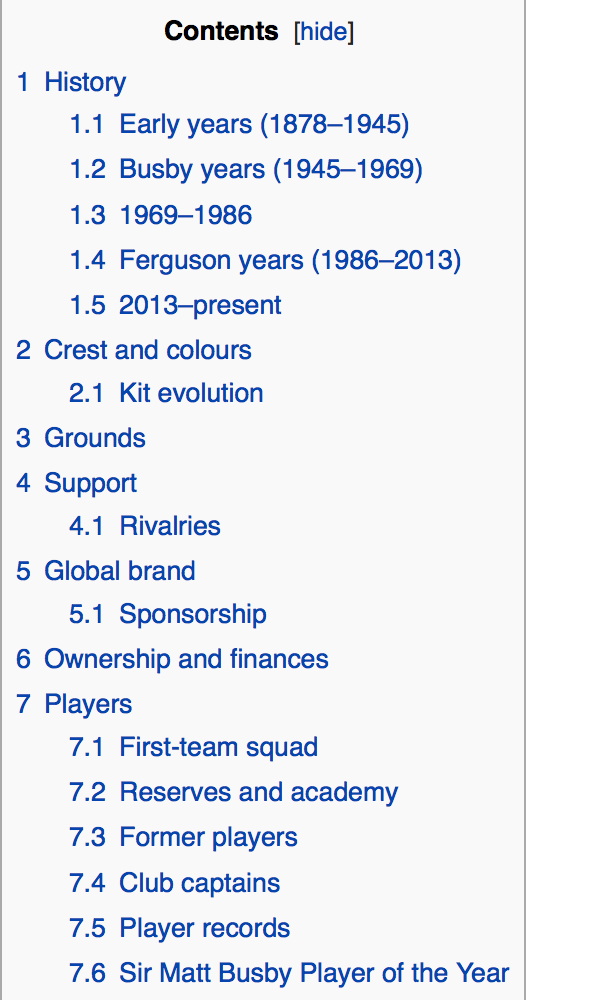
A jump menu is a list of section links (usually based on headings) displayed at the top of a post. Clicking a link smoothly scrolls the user to that section, improving navigation and user experience, especially for long-form content.
This guide walks through how to automatically generate a jump menu from your post headings.
How It Works
We will scan the post content for heading tags (for example, h3) and dynamically:
- Add unique IDs to each heading
- Generate a list of anchor links (jump menu)
- Output both the menu and the modified content
Step 1: Add Function to functions.php
Add the following function to your theme’s functions.php file:
function auto_jump_menu_smj($content, $heading = null) {
    $jump_menu = '';
    $id = array();
    $content2 = '';
    $i = 0;

    $content = preg_replace_callback('/(\<h3(.*?))\>(.*)(<\/h3>)/i', function($matches) use (&$jump_menu, &$id) {

        if (!stripos($matches[0], 'id=')) {
            $slug = sanitize_title($matches[3]);

            // Add ID to heading
            $matches[0] = '<h3' . $matches[2] . ' id="' . $slug . '">' . $matches[3] . '</h3>';

            // Build jump menu
            $jump_menu .= '<li><a href="#' . $slug . '">' . $matches[3] . '</a></li>';

            $id[] = $slug;
        }

        return $matches[0];
    }, $content);

    // Output heading title if provided
    if ($heading) {
        echo '<h2>' . esc_html($heading) . '</h2>';
    }

    // Output jump menu
    echo '<ul class="jump-menu">' . $jump_menu . '</ul>';

    // Wrap content sections
    $sections = explode("\n", $content);
    foreach ($sections as $section) {
        if (!empty($section)) {
            $class = ($i === 0) ? ' first-sub-head' : '';
            $content2 .= '<div class="subhead' . $class . '">' . $section . '</div>';
            $i++;
        }
    }

    return $content2;
}Step 2: How to Use
Option 1: Call as a Function
You can manually render the jump menu anywhere in your template:
echo auto_jump_menu_smj(get_the_content(), 'Project Details');- First argument: Post content
- Second argument: Optional jump menu title
Option 2: Automatically Apply to All Posts
Hook into WordPress content filters:
add_filter('the_content', 'auto_jump_menu_smj');or
add_filter('get_the_content', 'auto_jump_menu_smj');This will automatically generate a jump menu for all posts using matching headings.
Step 3: Add Smooth Scrolling
To improve UX, you can animate the scroll behavior using jQuery:
$('a[href*="#"]').on('click', function(event){
    event.preventDefault();
    $('html, body').animate({
        scrollTop: $(this.hash).offset().top
    }, 500);
});